

Running an import job
An import job is the thing that turns a deposit into a new version of an Archival Group. Nothing else writes to the repository. In the UI you do not write one: you ask the platform to work out the difference between the deposit and the object as it stands, look at what it proposes, and run it.
Before the button works
Section titled “Before the button works”Create diff import job sits below the file table on the Deposit page. It is missing, or disabled, more often than it is available, and each case means something:
| What you see | Why |
|---|---|
| No jobs can be run as this deposit does not have an archival group specified. | Set the Archival Group path in the deposit’s properties. |
| No jobs can be run as there are no valid files in the Deposit. | The deposit is for an object that does not exist yet and there is nothing under objects/. |
| No jobs can be run as this deposit is no longer active. | An import job has already run. Activate it if it ended in error and you want to try again. |
| No jobs can be run as the Deposit status is currently ‘Exporting’. | Wait for the export to finish. |
| The button is there but greyed out | Either a pipeline run is in progress, or the deposit has files whose metadata disagrees with the METS — the red banner above says how many. Add those files to the METS again and the button comes back. |
One more requirement is not announced in advance, and it bites late: a job that creates an object needs an Archival Group Name. The diff itself does not mind — it is the Storage API that refuses, at execution, so the job comes back completedWithErrors rather than failing up front. An update to an existing object does not need one.
The diff
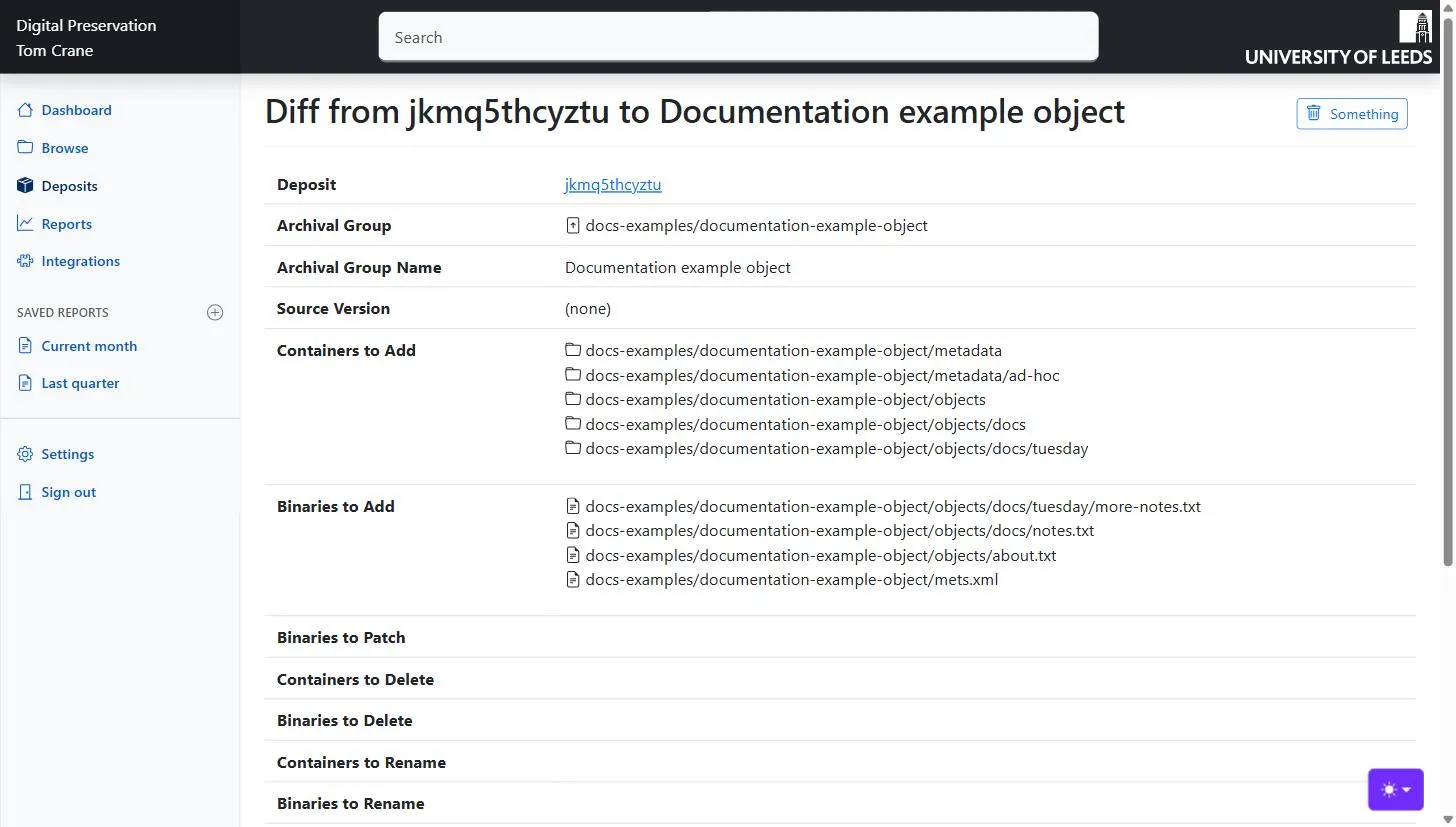
Section titled “The diff”The button takes you to a page showing what the platform proposes to do, under the same set of headings the import job itself uses:
| Heading | What it lists |
|---|---|
| Deposit, Archival Group, Archival Group Name | What this job is for. An existing object’s path is a link; a new one is not, because there is nothing there yet. |
| Source Version | The version this job starts from, or (none) for a brand-new object. |
| Containers to Add / Binaries to Add | Folders and files that will be created. |
| Binaries to Patch | Files that exist and whose content will be replaced. |
| Containers to Delete / Binaries to Delete | What will be removed from the object. |
| Containers to Rename / Binaries to Rename | What will change name or path. |
Read it as the answer to “what would preserving this deposit actually change?”. For a first version everything is an addition. For an update, the interesting lists are the deletions and patches: a file you did not mean to touch appearing under Binaries to Delete is the thing this page exists to catch, and usually means a file was removed from the workspace when only the METS entry should have gone.
A diff that cannot be run
Section titled “A diff that cannot be run”Two problems stop the job before it starts, and both are reported in red at the top of the page with the offending items listed.
Invalid paths. Repository paths permit only a-z A-Z 0-9 . _ - % ( ), and a file whose name contains anything else cannot be given a URL. Rename the file in the deposit — the platform keeps the original name separately, so nothing is lost by giving the file a safe path.
Unidentified content types. A file being added with no usable media type. Set the content type on the file, or run the pipeline so that format identification fills it in.
When either is present the page says “This import job is invalid” and offers no way to run it.
Below the job there is a read-only text area holding the job as raw JSON. Editing a diff by hand is not implemented in the UI; the API can take a job you have written yourself.
Running it
Section titled “Running it”-
Read the lists. This is the last point at which anything can be reconsidered.
-
Click Run Import (Preserve).
-
You land on the result page for this run, which is where you watch it.
Import jobs run asynchronously — the click submits the job rather than waiting for it — so the page you arrive at may well show the job as still running.
The maintenance-only option
Section titled “The maintenance-only option”Where the instance has METS ID normalisation enabled, a tick box appears above the Preserve button: Maintenance only — keep this version out of the Activity Stream.
It is for changes that alter how an object is recorded rather than what it holds. Normalising identifiers inside a METS file gives downstream systems nothing to rebuild, so announcing it as a change would be both wasted work and a misleading history. The version is still created and the event is still recorded; it is simply not published to the activity stream, so IIIF and other consumers are not told to reprocess the object.
Leave it unticked for any change to the object’s content.
The result
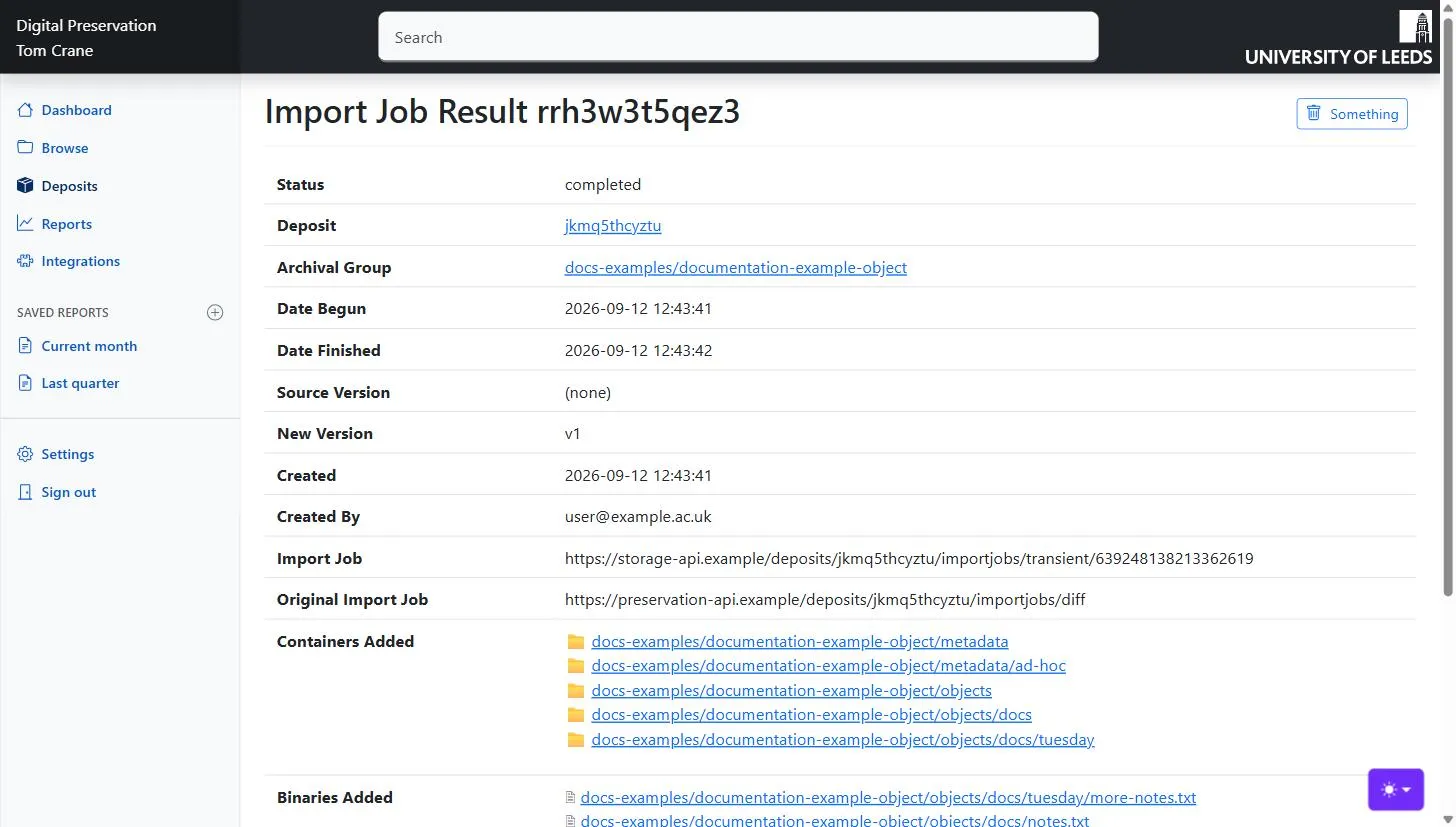
Section titled “The result”The result page is a summary of one run.
Status is the first row, and is colour-coded: waiting and running in progress, completed plain, completedWithErrors in red. The page does not refresh itself — reload it to see the job move on. A large object can take a while.
Errors, when there are any, come next: each one in a red box, in the platform’s own words. An import job that fails part way leaves the object as it was; OCFL versions are all-or-nothing.
Then the facts of the run: the deposit and Archival Group it was for (both links), when it began and finished, the Source Version it started from and the New Version it produced, and who submitted it. A new version number appearing here is the confirmation that the object has changed.
Finally the same seven lists as the diff, but in the past tense — containers and binaries added, patched, deleted and renamed — with each item a link into Browse. This is what actually happened, which is not always identical to what was proposed.
The jobs for a deposit
Section titled “The jobs for a deposit”The Deposit page lists every import job that has been submitted for it, under Import Jobs: status, who ran it, when it began and finished, the version it went from and to, and any errors. The status is a link back to the result page.
There is usually only one. More than one means an earlier attempt failed and the deposit was activated and retried; jobs submitted through the API rather than this page can also be numerous.